The Problem: Autoscaling Was Working, But It Was Not Fast
Autoscaling is supposed to save you when traffic increases.
In theory, an Auto Scaling Group launches a new instance, the application starts, the load balancer marks it healthy, and everyone goes home happy.
In practice, our scale-out looked more like this:
New instance launches
        ↓
Registers with patching infrastructure
        ↓
Runs yum updates
        ↓
Reboots
        ↓
Runs more cleanup
        ↓
Finally becomes useful
That meant a newly scaled-out instance could take 15–20 minutes before it was actually ready to serve traffic.
That is not autoscaling. That is AWS ordering a pizza and hoping it arrives before the users notice.
After the automation, the same scale-out path dropped to roughly 2–4 minutes.
The goal was simple:
Stop patching during scale-out. Patch the image ahead of time.
This article walks through the pattern I used to automate that AMI lifecycle using Terraform, EC2 Image Builder, Lambda, EventBridge Scheduler, Launch Templates, and Auto Scaling warm pools.
The implementation shown here is sanitized and generic, but it follows the same structure as the real production workflow.
What This Automation Does
This is not a one-time AMI creation script.
This is a recurring AMI refresh factory.
Every month, the workflow:
- Reads the AMI currently used by the production launch template.
- Creates a new EC2 Image Builder recipe using that AMI as the parent.
- Runs Image Builder with a custom patching component.
- Registers the temporary build instance with Red Hat Satellite.
- Applies OS updates.
- Reboots the build instance.
- Performs cleanup.
- Unregisters the build instance from Satellite.
- Creates a new AMI.
- Updates the launch template with a new default version.
- Tags the AMI and snapshots.
- Terminates warm pool instances so Auto Scaling recreates them from the new AMI.
The running production instances are not force-refreshed by this process. They are patched during the normal monthly maintenance window.
That distinction matters.
This automation exists to solve the future scale-out problem, not to surprise-reboot the current production fleet because the automation got excited.
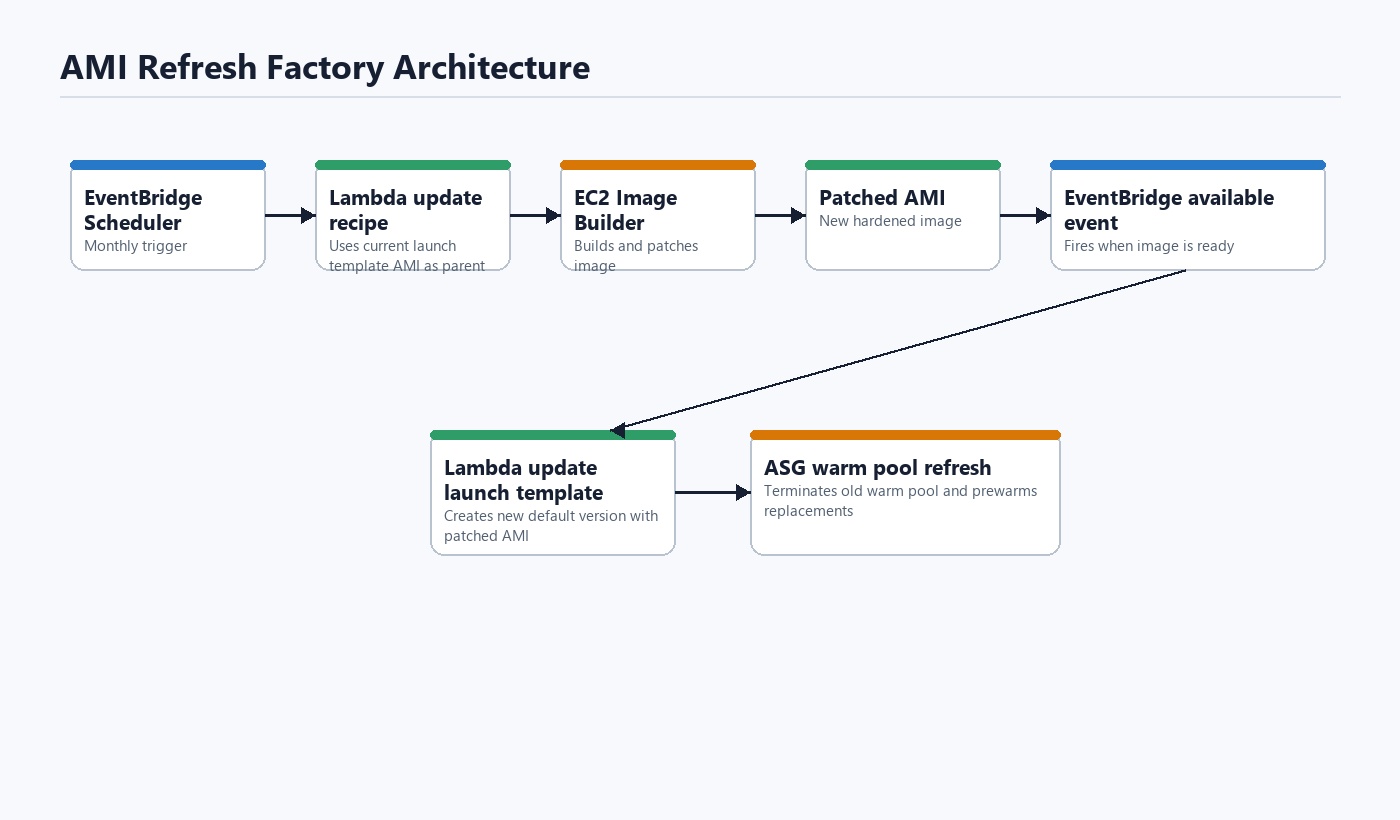
Architecture

Diagram description:
EventBridge Scheduler
        ↓
Lambda: UpdateRecipeAndTrigger
        ↓
Read current AMI from Launch Template
        ↓
Create new Image Builder Recipe
        ↓
Create new Distribution Configuration
        ↓
Update Image Builder Pipeline
        ↓
Start Image Builder Pipeline
        ↓
Temporary EC2 build instance
        ↓
Register with Red Hat Satellite
        ↓
yum update + reboot + cleanup
        ↓
Create new AMI
        ↓
Image Builder AVAILABLE event
        ↓
EventBridge Rule
        ↓
Lambda: UpdateLaunchTemplateAMI
        ↓
Create new Launch Template version
        ↓
Set new version as default
        ↓
Tag AMI and snapshots
        ↓
Terminate warm pool instances
        ↓
Auto Scaling recreates warm pool using the new AMI
AWS documents that EC2 Image Builder publishes image state change events to EventBridge, including transitions to an available state. EventBridge can then invoke a target such as Lambda. See the AWS references at the end of the article.
Before and After
| State | Scale-out readiness time |
|---|---|
| Before automation | 15–20 minutes |
| After automation | 2–4 minutes |
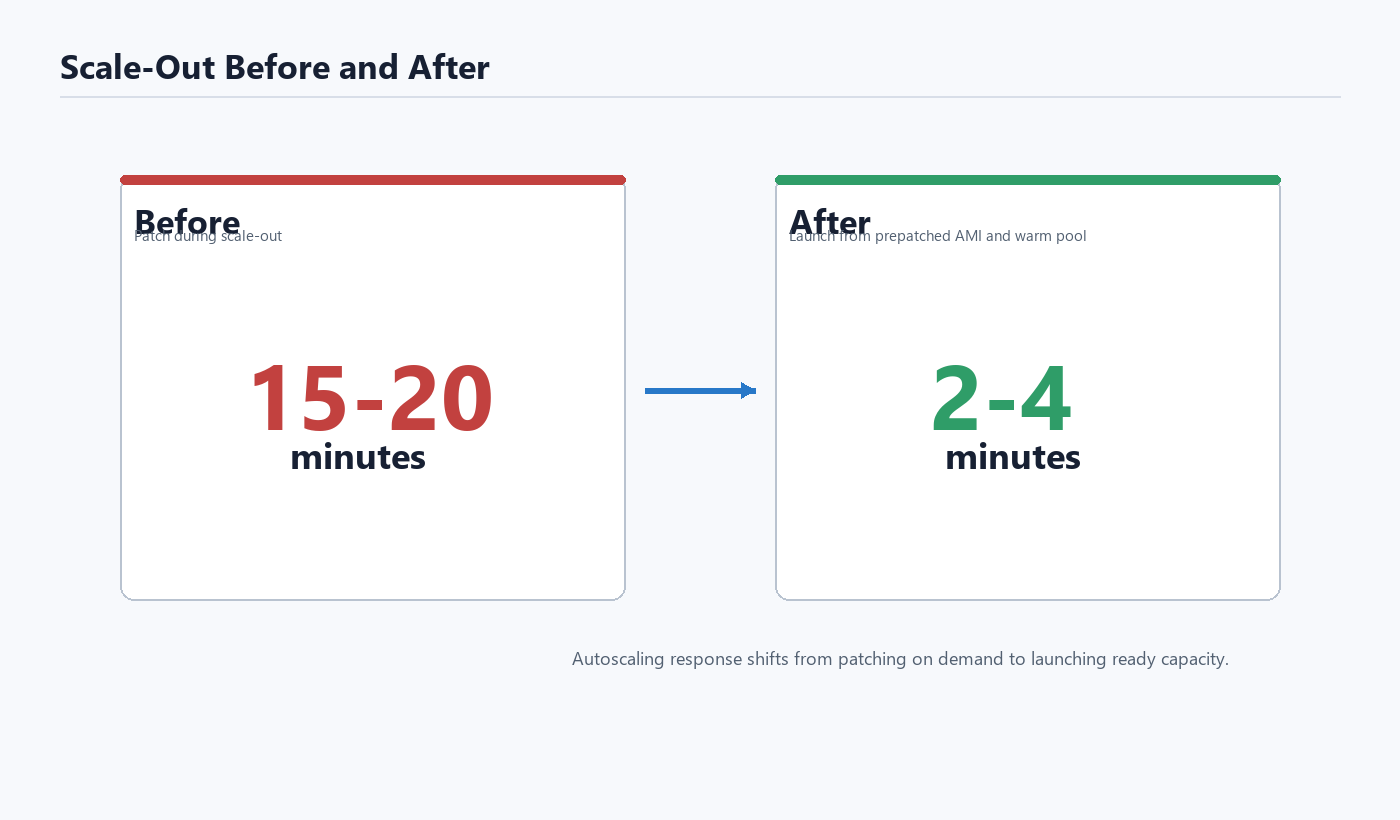
The improvement came from moving the patching work out of the scale-out path.
Before:
Scale-out = boot + patch + reboot + cleanup + start app
After:
Scale-out = boot + start app
This is the part that matters. The instance is not magically faster. It is simply no longer doing monthly maintenance work at the worst possible time.
Why Not Just Use ASG Instance Refresh?
Because that would solve a different problem.
The running instances already get patched during the monthly patch maintenance window. Forcing an Auto Scaling Group Instance Refresh immediately after building the new AMI would be unnecessary and potentially disruptive.
The real issue was the warm pool and future scale-out capacity.
Auto Scaling warm pools keep pre-initialized instances ready so scale-out is faster. That is great, but if those warm pool instances were created from the old launch template version, they would still be based on the old AMI.
So the Lambda updates the launch template and then terminates the existing warm pool instances. Auto Scaling replaces them, and the replacements are created from the new default launch template version.
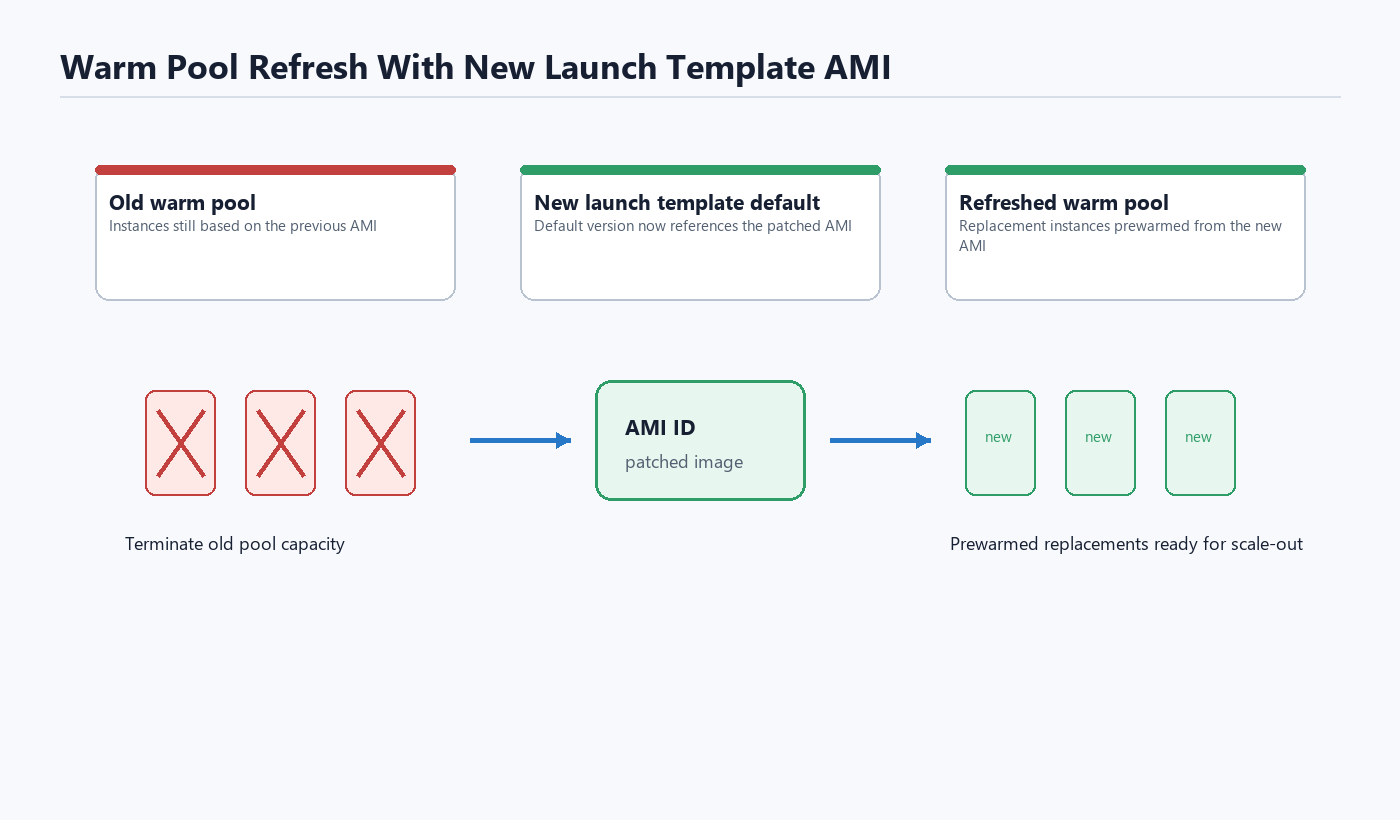
That gives us the behavior we actually want:
Existing running fleet
        ↓
Patched during normal maintenance window

Warm pool capacity
        ↓
Recreated from the new AMI

Future scale-out capacity
        ↓
Uses the new AMI
No unnecessary production churn. No surprise instance refresh. No 20-minute scale-out penalty.
Terraform: Dead Letter Queue
The EventBridge Scheduler target uses a dead letter queue so failed invocations are not silently lost.
resource "aws_sqs_queue" "scheduler_dead_letter_queue" {
  name                              = "scheduler-dead-letter-queue-${var.environment}"
  fifo_queue                        = false
  content_based_deduplication       = false
  delay_seconds                     = 0
  kms_data_key_reuse_period_seconds = 300
  max_message_size                  = 1048576
  message_retention_seconds         = 345600
  receive_wait_time_seconds         = 0
  sqs_managed_sse_enabled           = true
  visibility_timeout_seconds        = 30

  tags = {
    Name = "scheduler-dead-letter-queue-${var.environment}"
  }
}
Do not skip the DLQ. Event-driven automation without failure visibility is just a very fancy way to lose errors.
Terraform: EC2 Image Builder Component
The Image Builder component handles the patching workflow.
The build instance:
- Installs the Satellite consumer package.
- Registers with Red Hat Satellite.
- Runs OS updates.
- Reboots.
- Removes old install-only packages.
- Cleans yum metadata.
- Unregisters from Satellite.
Sanitized example:
resource "aws_imagebuilder_component" "custom_scripts" {
  name     = "custom-update-scripts-${var.environment}"
  platform = "Linux"
  version  = "1.0.0"

  data = yamlencode({
    name          = "CustomUpdateScripts"
    description   = "Custom scripts to update AMI"
    schemaVersion = 1.0
    phases = [{
      name = "build"
      steps = [
        {
          name   = "PreRebootScript"
          action = "ExecuteBash"
          inputs = {
            commands = [
              "echo 'Running pre-reboot scripts'",
              "yum install -y http://satellite.example.com/pub/katello-ca-consumer-latest.noarch.rpm",
              "subscription-manager register --serverurl=https://satellite.example.com --activationkey=AK-APP-RHEL9 --org=EXAMPLE_ORG",
              "yum update -y"
            ]
          }
        },
        {
          name   = "RebootInstance"
          action = "Reboot"
        },
        {
          name   = "PostRebootScript"
          action = "ExecuteBash"
          inputs = {
            commands = [
              "echo 'Running post-reboot scripts'",
              "yum remove --oldinstallonly -y",
              "yum clean all",
              "subscription-manager unregister",
              "echo 'Custom update scripts completed'"
            ]
          }
        }
      ]
    }]
  })
}
For RHEL-based images, this keeps the AMI patched through the same Satellite content path used by the rest of the environment.
That is important. The AMI should not be patched from a mystery repository just because the automation is running in AWS.
Terraform: Initial Image Recipe
The initial recipe is mostly a bootstrap object.
The important part is the lifecycle block. The recipe parent image and version are later updated dynamically by Lambda, not by Terraform on every run.
resource "aws_imagebuilder_image_recipe" "main" {
  name         = "ami-update-recipe-${var.environment}"
  parent_image = var.initial_ami_id
  version      = "1.0.0"

  component {
    component_arn = aws_imagebuilder_component.custom_scripts.arn
  }

  lifecycle {
    ignore_changes = [
      parent_image,
      version,
    ]
  }
}
This keeps Terraform from fighting the automation.
That is a theme with cloud automation: sometimes the hardest part is teaching your tools not to slap each other.
Terraform: Infrastructure Configuration
This tells Image Builder where and how to launch the temporary build instance.
resource "aws_imagebuilder_infrastructure_configuration" "main" {
  name                          = "ami-update-infra-${var.environment}"
  instance_profile_name         = var.image_builder_instance_profile
  instance_types                = ["t3.medium"]
  subnet_id                     = var.image_builder_subnet_id
  security_group_ids            = [var.image_builder_security_group_id]
  terminate_instance_on_failure = true
}
Use a subnet and security group that can reach:
- Red Hat Satellite
- package repositories
- required AWS endpoints
- CloudWatch Logs, if you collect build logs
If the build instance cannot reach Satellite, the automation will do exactly what you asked it to do: fail automatically every month. Very reliable. Very useless.
Terraform: Distribution Configuration
The distribution configuration controls the AMI name and tags.
resource "aws_imagebuilder_distribution_configuration" "main" {
  name = "ami-update-distribution-${var.environment}"

  distribution {
    region = "us-west-2"

    ami_distribution_configuration {
      name = "updated-ami-${var.environment}-{{ imagebuilder:buildDate }}"

      ami_tags = {
        Name          = "UpdatedAMI-${upper(var.environment)}"
        CreatedBy     = "EC2 Image Builder"
        BusinessOwner = "Internal"
        BuildDate     = "{{ imagebuilder:buildDate }}"
        Environment   = var.environment
      }
    }
  }
}
The real workflow also creates dynamic distribution configurations from Lambda so the tags include the source AMI and build timestamp.
Terraform: Image Pipeline
The Image Builder pipeline is enabled, but it does not run on its own schedule. Lambda starts it after updating the recipe.
resource "aws_imagebuilder_image_pipeline" "main" {
  name                             = "ami-update-pipeline-${var.environment}"
  image_recipe_arn                 = aws_imagebuilder_image_recipe.main.arn
  infrastructure_configuration_arn = aws_imagebuilder_infrastructure_configuration.main.arn
  distribution_configuration_arn   = aws_imagebuilder_distribution_configuration.main.arn
  status                           = "ENABLED"

  lifecycle {
    ignore_changes = [
      distribution_configuration_arn,
      image_recipe_arn,
    ]
  }
}
Again, Terraform creates the foundation. Lambda performs the monthly mutation.
Terraform: Monthly EventBridge Scheduler
The schedule runs the first Tuesday of every month at 6:00 PM Pacific time.
resource "aws_scheduler_schedule" "monthly_trigger" {
  name       = "monthly-ami-update-${var.environment}"
  group_name = "default"

  flexible_time_window {
    mode = "OFF"
  }

  schedule_expression          = "cron(0 18 ? * TUE#1 *)"
  schedule_expression_timezone = "America/Los_Angeles"

  target {
    arn      = aws_lambda_function.update_recipe_and_trigger.arn
    role_arn = aws_iam_role.scheduler_role.arn

    retry_policy {
      maximum_retry_attempts = 0
    }

    dead_letter_config {
      arn = aws_sqs_queue.scheduler_dead_letter_queue.arn
    }
  }
}
This is the monthly kick-off.
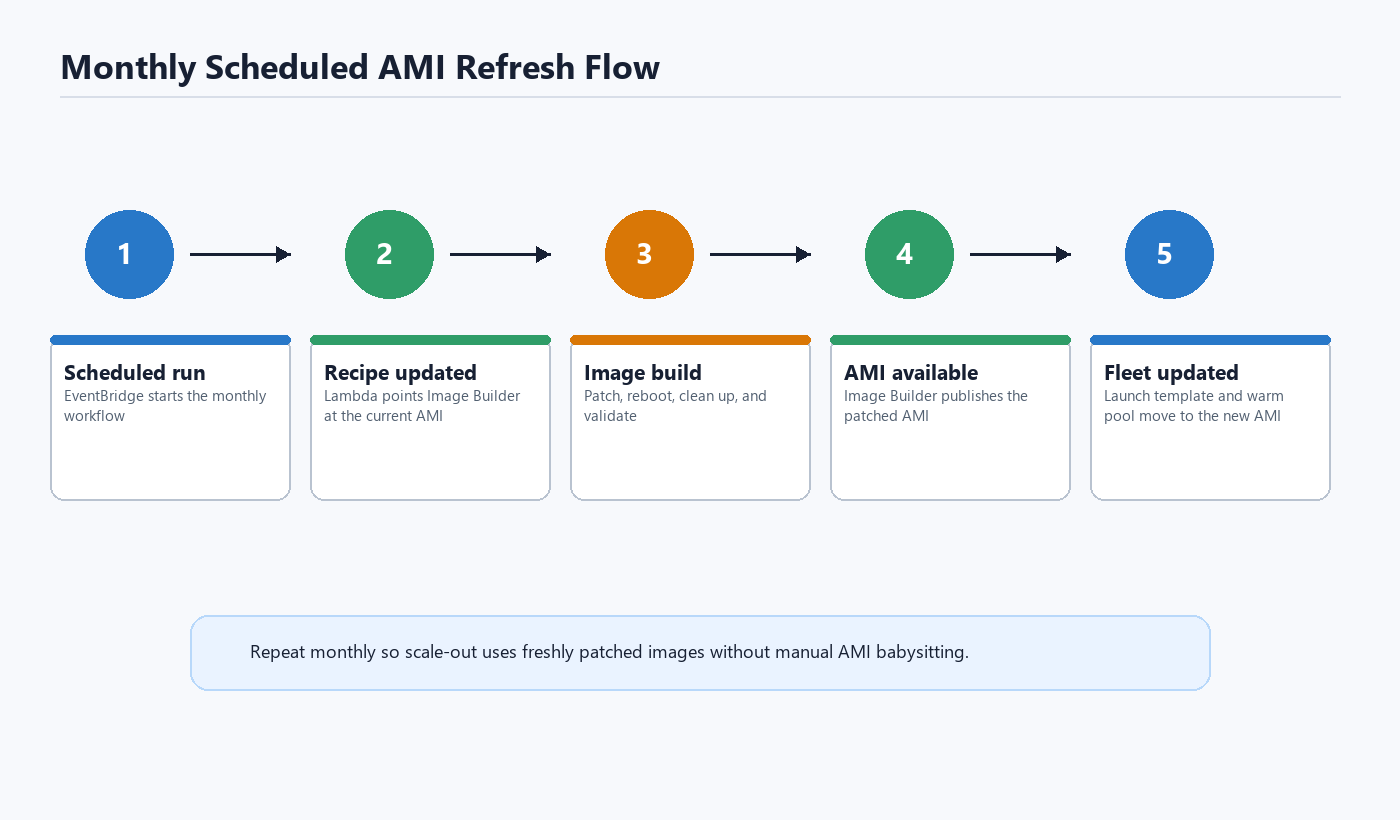
No console clicking. No calendar reminder. No “who owns patching the AMI this month?” conversation.
Lambda #1: Update Recipe and Trigger Image Builder
The first Lambda performs the most important trick in the system.
It reads the AMI currently used by the launch template default version:
lt_response = ec2.describe_launch_templates(
    LaunchTemplateNames=[launch_template_name]
)
current_lt_id = lt_response['LaunchTemplates'][0]['LaunchTemplateId']

version_response = ec2.describe_launch_template_versions(
    LaunchTemplateId=current_lt_id,
    Versions=['$Default']
)

current_ami = version_response['LaunchTemplateVersions'][0]['LaunchTemplateData']['ImageId']
That means the pipeline is self-feeding:
Current launch template AMI
        ↓
New Image Builder parent AMI
        ↓
New patched AMI
        ↓
New launch template default AMI
        ↓
Next month starts from that AMI
Here is the sanitized Lambda:
import json
import boto3
import os
from datetime import datetime
from zoneinfo import ZoneInfo

ec2 = boto3.client('ec2')
imagebuilder = boto3.client('imagebuilder')
sts = boto3.client('sts')


def handler(event, context):
    launch_template_name = os.environ['LAUNCH_TEMPLATE_NAME']
    initial_ami_id = os.environ.get('INITIAL_AMI_ID')

    try:
        lt_response = ec2.describe_launch_templates(
            LaunchTemplateNames=[launch_template_name]
        )
        current_lt_id = lt_response['LaunchTemplates'][0]['LaunchTemplateId']

        version_response = ec2.describe_launch_template_versions(
            LaunchTemplateId=current_lt_id,
            Versions=['$Default']
        )
        current_ami = version_response['LaunchTemplateVersions'][0]['LaunchTemplateData']['ImageId']

    except Exception as e:
        print(f"Could not get AMI from launch template: {e}")
        if initial_ami_id:
            current_ami = initial_ami_id
            print(f"Using initial AMI: {current_ami}")
        else:
            raise Exception("No launch template found and no initial AMI provided")

    timestamp = datetime.now().strftime('%Y%m%d%H%M%S')
    now = datetime.now()
    new_version = f"{now.strftime('%Y%m%d')}.{now.strftime('%H%M')}.0"

    recipe_response = imagebuilder.create_image_recipe(
        name=f'ami-update-recipe-{timestamp}',
        description='Dynamic AMI update recipe',
        semanticVersion=new_version,
        components=[{
            'componentArn': os.environ['COMPONENT_ARN']
        }],
        parentImage=current_ami,
        tags={
            'CreatedBy': 'DynamicPipeline',
            'SourceAMI': current_ami
        }
    )

    account_id = sts.get_caller_identity()['Account']

    now_pacific = datetime.now(ZoneInfo('America/Los_Angeles'))
    pacific_date = now_pacific.strftime('%Y-%m-%d')

    dist_response = imagebuilder.create_distribution_configuration(
        name=f'ami-update-distribution-{timestamp}',
        description='Dynamic distribution configuration with AMI tags',
        distributions=[{
            'region': 'us-west-2',
            'amiDistributionConfiguration': {
                'name': f'{pacific_date}-PROD-AUTOSCALE-TEMPLATE-{{{{ imagebuilder:buildDate }}}}',
                'amiTags': {
                    'Name': f'CIB-UpdatedAMI-{timestamp}',
                    'CreatedBy': 'EC2 Image Builder',
                    'BusinessOwner': 'Internal',
                    'SourceAMI': current_ami,
                    'BuildTimestamp': timestamp
                },
                'targetAccountIds': [account_id]
            }
        }]
    )

    imagebuilder.update_image_pipeline(
        imagePipelineArn=os.environ['PIPELINE_ARN'],
        imageRecipeArn=recipe_response['imageRecipeArn'],
        infrastructureConfigurationArn=os.environ['INFRA_CONFIG_ARN'],
        distributionConfigurationArn=dist_response['distributionConfigurationArn']
    )

    imagebuilder.start_image_pipeline_execution(
        imagePipelineArn=os.environ['PIPELINE_ARN']
    )

    return {
        'statusCode': 200,
        'body': json.dumps(f'Updated recipe with AMI {current_ami} and started pipeline')
    }
This is the heart of the system.
Instead of hardcoding the source AMI forever, the automation asks production what it is currently using, then uses that as the next base image.
Terraform: Image Builder Complete Event
When Image Builder finishes and the new image becomes available, EventBridge invokes the second Lambda.
resource "aws_cloudwatch_event_rule" "image_builder_complete" {
  name        = "image-builder-complete-${var.environment}"
  description = "Trigger when Image Builder pipeline completes"

  event_pattern = jsonencode({
    source      = ["aws.imagebuilder"]
    detail-type = ["EC2 Image Builder Image State Change"]
    detail = {
      state = {
        status = ["AVAILABLE"]
      }
    }
  })
}

resource "aws_cloudwatch_event_target" "lambda_target" {
  rule      = aws_cloudwatch_event_rule.image_builder_complete.name
  target_id = "LambdaTarget"
  arn       = aws_lambda_function.update_launch_template.arn
}
In a multi-pipeline account, I recommend filtering this further to the specific pipeline or image ARN pattern so one Image Builder pipeline does not accidentally trigger automation for another application.
Because nothing says “fun afternoon” like updating the wrong launch template with the wrong AMI.
Lambda #2: Update Launch Template and Refresh Warm Pool
The second Lambda receives the Image Builder AVAILABLE event.
It:
- Extracts the Image Builder image ARN from the event.
- Calls
get_imageto find the produced AMI ID. - Creates a new launch template version with that AMI.
- Sets the new launch template version as default.
- Tags the AMI.
- Tags the AMI snapshots.
- Terminates warm pool instances so they are recreated from the new AMI.
Sanitized Lambda:
import json
import boto3
import os
from datetime import datetime, timezone
from zoneinfo import ZoneInfo

ec2 = boto3.client('ec2')
autoscaling = boto3.client('autoscaling')


def handler(event, context):
    print(f"Received event: {json.dumps(event)}")

    launch_template_name = os.environ['LAUNCH_TEMPLATE_NAME']

    image_arn = event['resources'][0]
    print(f"Image ARN: {image_arn}")

    imagebuilder = boto3.client('imagebuilder')
    image_response = imagebuilder.get_image(
        imageBuildVersionArn=image_arn
    )

    new_ami_id = image_response['image']['outputResources']['amis'][0]['image']
    print(f"New AMI ID: {new_ami_id}")

    lt_response = ec2.describe_launch_templates(
        LaunchTemplateNames=[launch_template_name]
    )
    current_lt_id = lt_response['LaunchTemplates'][0]['LaunchTemplateId']

    response = ec2.create_launch_template_version(
        LaunchTemplateId=current_lt_id,
        SourceVersion='$Latest',
        LaunchTemplateData={
            'ImageId': new_ami_id
        }
    )

    new_version = response['LaunchTemplateVersion']['VersionNumber']

    ec2.modify_launch_template(
        LaunchTemplateId=current_lt_id,
        DefaultVersion=str(new_version)
    )

    event_time = event.get('time')
    if event_time:
        dt_utc = datetime.fromisoformat(event_time.replace('Z', '+00:00'))
    else:
        dt_utc = datetime.now(timezone.utc)

    dt_local = dt_utc.astimezone(ZoneInfo('America/Los_Angeles'))
    date_str = dt_local.strftime('%Y-%m-%d')

    ami_name = f'{date_str}-PROD-AUTOSCALE-TEMPLATE'

    ec2.create_tags(
        Resources=[new_ami_id],
        Tags=[{
            'Key': 'Name',
            'Value': ami_name
        }]
    )

    ami_response = ec2.describe_images(ImageIds=[new_ami_id])
    snapshot_ids = []

    for ami in ami_response['Images']:
        for block_device in ami.get('BlockDeviceMappings', []):
            if 'Ebs' in block_device and 'SnapshotId' in block_device['Ebs']:
                snapshot_ids.append(block_device['Ebs']['SnapshotId'])

    if snapshot_ids:
        ec2.create_tags(
            Resources=snapshot_ids,
            Tags=[{
                'Key': 'Name',
                'Value': ami_name
            }]
        )

    asg_name = os.environ.get('AUTOSCALING_GROUP_NAME')
    print(f"ASG Name: {asg_name}")

    if asg_name:
        warm_pool_response = autoscaling.describe_warm_pool(
            AutoScalingGroupName=asg_name
        )

        warm_instances = warm_pool_response.get('Instances', [])
        print(f"Warm pool instances: {len(warm_instances)}")

        instance_ids = [instance['InstanceId'] for instance in warm_instances]

        if instance_ids:
            print(f"Terminating warm pool instances: {instance_ids}")
            ec2.terminate_instances(InstanceIds=instance_ids)
    else:
        print("AUTOSCALING_GROUP_NAME not set")

    return {
        'statusCode': 200,
        'body': json.dumps(
            f'Updated launch template {launch_template_name} to AMI {new_ami_id}, version {new_version}'
        )
    }
One thing to call out: launch templates are versioned. You do not modify the existing template version in place. You create a new version and set it as the default.
That is exactly what this Lambda does.
IAM Policy: EventBridge Scheduler Execution Role
The scheduler needs permission to invoke the first Lambda and send failed invocation events to the DLQ.
Trust policy:
{
  "Version": "2012-10-17",
  "Statement": [
    {
      "Effect": "Allow",
      "Principal": {
        "Service": "scheduler.amazonaws.com"
      },
      "Action": "sts:AssumeRole"
    }
  ]
}
Permissions policy:
{
  "Version": "2012-10-17",
  "Statement": [
    {
      "Sid": "InvokeUpdateRecipeLambda",
      "Effect": "Allow",
      "Action": "lambda:InvokeFunction",
      "Resource": "arn:aws:lambda:us-west-2:ACCOUNT_ID:function:ami-update-recipe-and-trigger-*"
    },
    {
      "Sid": "SendFailuresToSchedulerDLQ",
      "Effect": "Allow",
      "Action": "sqs:SendMessage",
      "Resource": "arn:aws:sqs:us-west-2:ACCOUNT_ID:scheduler-dead-letter-queue-*"
    }
  ]
}
Replace ACCOUNT_ID and resource names with your environment-specific values.
IAM Policy: Lambda Resource Permission for Scheduler
Terraform should also create a Lambda resource-based permission allowing Scheduler to invoke the function.
resource "aws_lambda_permission" "allow_scheduler" {
  statement_id  = "AllowExecutionFromScheduler"
  action        = "lambda:InvokeFunction"
  function_name = aws_lambda_function.update_recipe_and_trigger.function_name
  principal     = "scheduler.amazonaws.com"
  source_arn    = aws_scheduler_schedule.monthly_trigger.arn
}
This is separate from the scheduler execution role. One side says, “Scheduler is allowed to call Lambda.” The other side says, “Lambda accepts calls from this Scheduler rule.”
IAM is fun like that.
IAM Policy: Lambda #1 Update Recipe and Trigger
This Lambda needs to:
- Read the launch template.
- Create Image Builder recipes.
- Create Image Builder distribution configurations.
- Update the Image Builder pipeline.
- Start the Image Builder pipeline.
- Get caller identity.
- Write CloudWatch logs.
Trust policy:
{
  "Version": "2012-10-17",
  "Statement": [
    {
      "Effect": "Allow",
      "Principal": {
        "Service": "lambda.amazonaws.com"
      },
      "Action": "sts:AssumeRole"
    }
  ]
}
Permissions policy:
{
  "Version": "2012-10-17",
  "Statement": [
    {
      "Sid": "ReadLaunchTemplate",
      "Effect": "Allow",
      "Action": [
        "ec2:DescribeLaunchTemplates",
        "ec2:DescribeLaunchTemplateVersions"
      ],
      "Resource": "*"
    },
    {
      "Sid": "ManageImageBuilderRecipeAndPipeline",
      "Effect": "Allow",
      "Action": [
        "imagebuilder:CreateImageRecipe",
        "imagebuilder:CreateDistributionConfiguration",
        "imagebuilder:UpdateImagePipeline",
        "imagebuilder:StartImagePipelineExecution"
      ],
      "Resource": "*"
    },
    {
      "Sid": "AllowImageBuilderTagging",
      "Effect": "Allow",
      "Action": [
        "imagebuilder:TagResource"
      ],
      "Resource": "*"
    },
    {
      "Sid": "GetAccountId",
      "Effect": "Allow",
      "Action": "sts:GetCallerIdentity",
      "Resource": "*"
    },
    {
      "Sid": "WriteLambdaLogs",
      "Effect": "Allow",
      "Action": [
        "logs:CreateLogGroup",
        "logs:CreateLogStream",
        "logs:PutLogEvents"
      ],
      "Resource": "arn:aws:logs:us-west-2:ACCOUNT_ID:*"
    }
  ]
}
You can scope the Image Builder resources more tightly once the naming pattern is stable. During initial development, I prefer visibility and correctness first, then tighten the policy after the workflow is proven.
IAM Policy: EventBridge Rule Permission for Lambda #2
The EventBridge rule that watches for Image Builder AVAILABLE events needs permission to invoke the second Lambda.
resource "aws_lambda_permission" "allow_eventbridge" {
  statement_id  = "AllowExecutionFromEventBridge"
  action        = "lambda:InvokeFunction"
  function_name = aws_lambda_function.update_launch_template.function_name
  principal     = "events.amazonaws.com"
  source_arn    = aws_cloudwatch_event_rule.image_builder_complete.arn
}
IAM Policy: Lambda #2 Update Launch Template and Warm Pool
This Lambda needs to:
- Read the Image Builder output.
- Read and update launch templates.
- Create a new launch template version.
- Set the default launch template version.
- Tag AMIs and snapshots.
- Describe AMIs.
- Describe and terminate warm pool instances.
- Write CloudWatch logs.
Trust policy:
{
  "Version": "2012-10-17",
  "Statement": [
    {
      "Effect": "Allow",
      "Principal": {
        "Service": "lambda.amazonaws.com"
      },
      "Action": "sts:AssumeRole"
    }
  ]
}
Permissions policy:
{
  "Version": "2012-10-17",
  "Statement": [
    {
      "Sid": "ReadImageBuilderOutput",
      "Effect": "Allow",
      "Action": [
        "imagebuilder:GetImage"
      ],
      "Resource": "*"
    },
    {
      "Sid": "ReadLaunchTemplateAndImages",
      "Effect": "Allow",
      "Action": [
        "ec2:DescribeLaunchTemplates",
        "ec2:DescribeLaunchTemplateVersions",
        "ec2:DescribeImages"
      ],
      "Resource": "*"
    },
    {
      "Sid": "UpdateLaunchTemplateVersion",
      "Effect": "Allow",
      "Action": [
        "ec2:CreateLaunchTemplateVersion",
        "ec2:ModifyLaunchTemplate"
      ],
      "Resource": "arn:aws:ec2:us-west-2:ACCOUNT_ID:launch-template/*"
    },
    {
      "Sid": "TagAmiAndSnapshots",
      "Effect": "Allow",
      "Action": [
        "ec2:CreateTags"
      ],
      "Resource": [
        "arn:aws:ec2:us-west-2::image/*",
        "arn:aws:ec2:us-west-2:ACCOUNT_ID:snapshot/*"
      ]
    },
    {
      "Sid": "ManageWarmPoolInstances",
      "Effect": "Allow",
      "Action": [
        "autoscaling:DescribeWarmPool",
        "ec2:TerminateInstances"
      ],
      "Resource": "*"
    },
    {
      "Sid": "WriteLambdaLogs",
      "Effect": "Allow",
      "Action": [
        "logs:CreateLogGroup",
        "logs:CreateLogStream",
        "logs:PutLogEvents"
      ],
      "Resource": "arn:aws:logs:us-west-2:ACCOUNT_ID:*"
    }
  ]
}
A tighter ec2:TerminateInstances statement should be used in production. For example, require tags that identify warm pool instances for this specific Auto Scaling Group.
Example condition-based refinement:
{
  "Sid": "TerminateOnlyTaggedWarmPoolInstances",
  "Effect": "Allow",
  "Action": "ec2:TerminateInstances",
  "Resource": "arn:aws:ec2:us-west-2:ACCOUNT_ID:instance/*",
  "Condition": {
    "StringEquals": {
      "ec2:ResourceTag/aws:autoscaling:groupName": "my-production-asg"
    }
  }
}
Validate this condition in your own account before relying on it. Tag availability and service-created tags can vary depending on how the instances are launched and described.
IAM Policy: Image Builder Instance Profile
The temporary Image Builder instance needs an instance profile.
At minimum, it usually needs:
- SSM managed instance permissions, if using SSM.
- CloudWatch logs permissions, if collecting logs.
- EC2 Image Builder managed instance permissions.
- Network access to Satellite and package repositories.
Example using AWS managed policies:
resource "aws_iam_role" "image_builder_instance_role" {
  name = "ImageBuilderInstanceRole"

  assume_role_policy = jsonencode({
    Version = "2012-10-17"
    Statement = [
      {
        Effect = "Allow"
        Principal = {
          Service = "ec2.amazonaws.com"
        }
        Action = "sts:AssumeRole"
      }
    ]
  })
}

resource "aws_iam_role_policy_attachment" "image_builder_managed_instance_core" {
  role       = aws_iam_role.image_builder_instance_role.name
  policy_arn = "arn:aws:iam::aws:policy/EC2InstanceProfileForImageBuilder"
}

resource "aws_iam_role_policy_attachment" "ssm_managed_instance_core" {
  role       = aws_iam_role.image_builder_instance_role.name
  policy_arn = "arn:aws:iam::aws:policy/AmazonSSMManagedInstanceCore"
}

resource "aws_iam_instance_profile" "image_builder_instance_profile" {
  name = "ImageBuilderInstanceProfile"
  role = aws_iam_role.image_builder_instance_role.name
}
Depending on your logging and artifact strategy, you may also need permissions for S3, KMS, CloudWatch Logs, or Secrets Manager.
For Satellite registration, prefer not to hardcode secrets in the component. Use activation keys carefully, and treat them as sensitive operational credentials.
Terraform Variables
Example variables:
variable "environment" {
  description = "Deployment environment"
  type        = string
}

variable "launch_template_name" {
  description = "Name of the launch template to update"
  type        = string
}

variable "autoscaling_group_name" {
  description = "Name of the Auto Scaling Group"
  type        = string
}

variable "initial_ami_id" {
  description = "Initial AMI ID to start the pipeline. Used only for first deployment or fallback."
  type        = string
}

variable "image_builder_instance_profile" {
  description = "IAM instance profile for Image Builder"
  type        = string
}

variable "image_builder_security_group_id" {
  description = "Security group ID for Image Builder instances"
  type        = string
}

variable "image_builder_subnet_id" {
  description = "Subnet ID for Image Builder instances"
  type        = string
}
Operational Checks
After deployment, validate each step separately.
Check the schedule
Confirm EventBridge Scheduler exists and points to the correct Lambda.
aws scheduler get-schedule \
  --name monthly-ami-update-prod \
  --group-name default
Manually invoke Lambda #1
aws lambda invoke \
  --function-name ami-update-recipe-and-trigger-prod \
  --payload '{}' \
  response.json
Then check CloudWatch logs.
Check Image Builder execution
aws imagebuilder list-image-pipeline-images \
  --image-pipeline-arn <pipeline-arn>
Check the launch template default version
aws ec2 describe-launch-template-versions \
  --launch-template-name my-production-template \
  --versions '$Default'
Check the warm pool
aws autoscaling describe-warm-pool \
  --auto-scaling-group-name my-production-asg
The warm pool instances should be recreated after the launch template default version is updated.
Lessons Learned
1. Do not patch during scale-out
Scale-out should be boring and fast.
If your new instances spend 15–20 minutes patching before they can serve traffic, the Auto Scaling Group is technically working, but operationally limping.
2. Keep Terraform and Lambda responsibilities separate
Terraform creates the foundation:
- Image Builder component
- initial recipe
- pipeline
- infrastructure config
- scheduler
- Lambda functions
- permissions
Lambda handles the monthly dynamic state:
- current AMI discovery
- new recipe creation
- pipeline update
- pipeline execution
- launch template version update
- warm pool replacement
Trying to make Terraform own every monthly AMI mutation would create unnecessary state churn.
3. Warm pools need attention
Updating the launch template is not enough if warm pool instances were already created from the old AMI.
Terminate the warm pool instances and let Auto Scaling recreate them from the new launch template version.
4. Do not refresh the running fleet unless you actually need to
In this environment, running instances are patched during the monthly maintenance window.
The AMI automation exists to make future scale-out fast, not to create extra production churn.
5. Tag everything
Tag the AMI. Tag the snapshots. Tag the source AMI. Tag the build timestamp.
Future you will thank current you.
Future you is usually angry and holding a pager.
Final Result
The end result was simple and measurable:
Before: 15–20 minutes before a scaled-out instance became useful
After:  2–4 minutes
That improvement did not come from making Linux boot faster or making the application magical.
It came from removing unnecessary work from the scale-out path.
The monthly AMI refresh does the patching ahead of time. The launch template points to the new image. The warm pool is recreated. Future scale-out events use an already-patched AMI.
That is the whole trick.
And like most good infrastructure improvements, the best part is not that it is fancy.
The best part is that nobody has to remember to do it manually anymore.
References
- AWS EC2 Image Builder EventBridge integration: https://docs.aws.amazon.com/imagebuilder/latest/userguide/integ-eventbridge.html
- EC2 Image Builder events in EventBridge: https://docs.aws.amazon.com/eventbridge/latest/ref/events-ref-imagebuilder.html
- EventBridge Scheduler with Lambda: https://docs.aws.amazon.com/lambda/latest/dg/with-eventbridge-scheduler.html
- EventBridge Scheduler dead-letter queues: https://docs.aws.amazon.com/scheduler/latest/UserGuide/configuring-schedule-dlq.html
- EC2 launch template permissions: https://docs.aws.amazon.com/AWSEC2/latest/UserGuide/permissions-for-launch-templates.html
- Managing launch template versions: https://docs.aws.amazon.com/AWSEC2/latest/UserGuide/manage-launch-template-versions.html
- Auto Scaling warm pools: https://docs.aws.amazon.com/autoscaling/ec2/userguide/ec2-auto-scaling-warm-pools.html